

Global Weather Products
What weatherTAP Global offers: worldwide forecast radar, precipitation, temperature, wind, waves, simulated satellite and turbulence from the EarthCast model, and how to use the map and globe viewers.
weatherTAP Global shows forecast weather for the whole planet, land and ocean alike. The data comes from the global forecast model run by EarthCast Technologies (ECT), a U.S. company that weatherTAP has partnered with. This page describes the model, each product, and the two viewers.

About the forecasts
Many Earth-viewing satellites watch the planet continuously. EarthCast uses data from more than 50 of them to set the starting conditions for its global model, which then predicts how the atmosphere and oceans will change.
| EarthCast global model on weatherTAP | |
|---|---|
| Coverage | The whole world |
| New run | Twice a day, at 00Z and 12Z |
| Forecast length | 36 hours |
| Time step | One image for every hour |
| Resolution | About 20 km on average |
These are forecasts, not observations. Every product here, including the radar and satellite images, is the model's prediction of what the weather will look like at the time shown. There is no worldwide radar network. Like any forecast, it is most reliable in the first few hours after the model run and less so toward the end. For current conditions over the United States, use the Radar and Satellite sections.
The products
Precipitation
- Predictive Radar
- What a weather radar would be expected to show, everywhere in the world. Like a composite reflectivity image from a ground-based radar network, it shows the strongest reflectivity found anywhere in the column above each point, in dBZ. Separate color scales show where the model expects rain, a wintry mix or snow, from very light precipitation to very heavy rain or hail.
- Precipitation Accumulation
- The amount of precipitation the model expects to have fallen, in inches or centimeters.
- Snow Depth
- The forecast depth of snow on the ground, in inches or centimeters. This product is in the map viewer only.
Surface
- Temperature
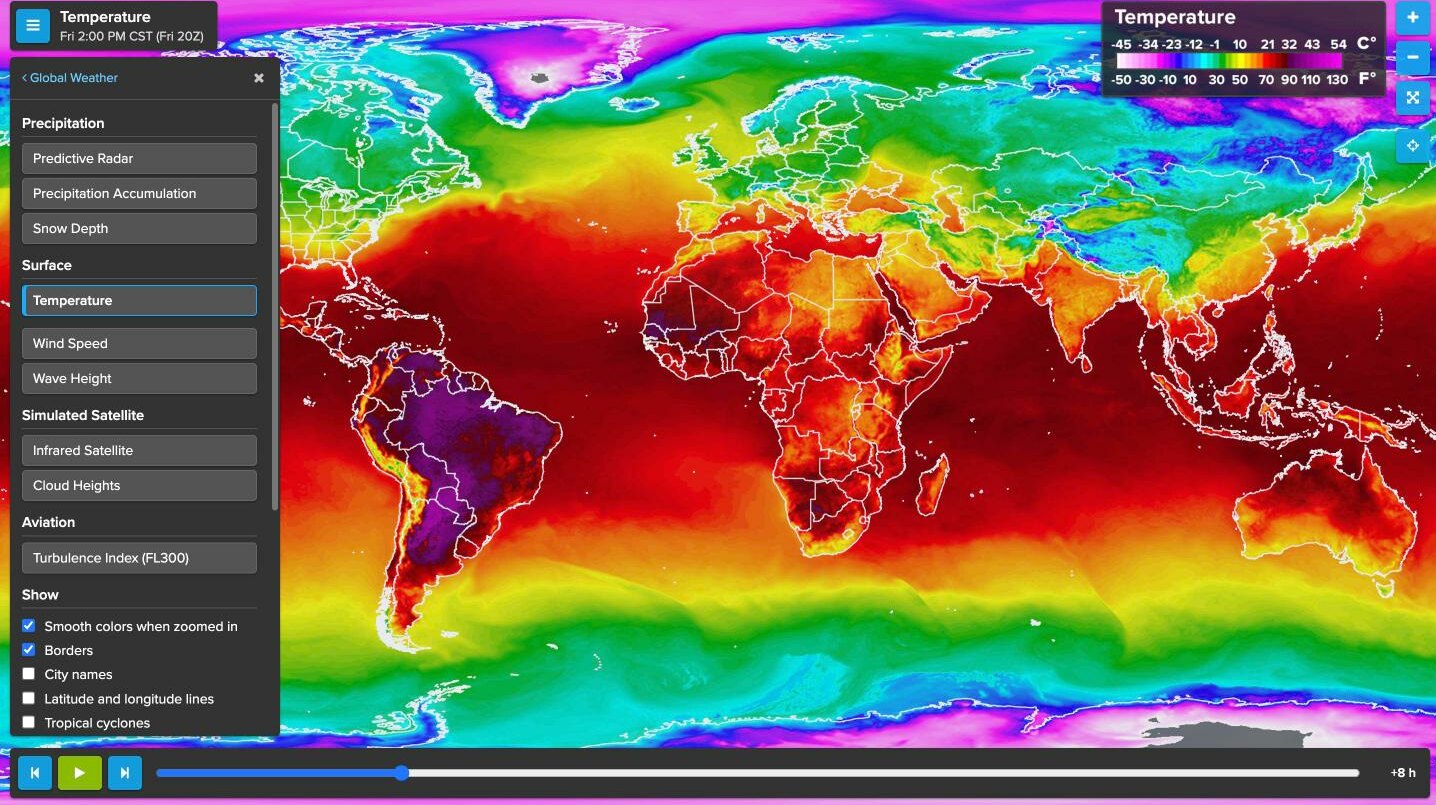
- Forecast air temperature 2 meters above the ground, over land and ocean.
- Wind Speed
- Forecast wind speed in knots, with optional arrows showing wind direction. Five levels are available:
The heights are typical values for each pressure level. The jet streams usually show up clearly at 30,000 ft.Level Pressure level Color scale Surface 10 meters above the surface 10 knots to over 100 knots 5,000 ft 850 mb 10 knots to over 100 knots 10,000 ft 700 mb 20 knots to over 190 knots 18,000 ft 500 mb 20 knots to over 190 knots 30,000 ft 300 mb 20 knots to over 190 knots - Wave Height
- Forecast significant wave height on the open ocean, in feet or meters. Significant wave height is the average height of the highest third of the waves, counting both wind-driven waves and swell. It is close to what an experienced observer would report. Individual waves can be considerably higher.
Simulated satellite
- Infrared Satellite
- The forecast clouds as they would appear in an infrared satellite image. An infrared image shows temperature, so it works day and night. Lower, warmer clouds are in shades of grey, and colder, higher cloud tops are in color.
- Cloud Heights
- The forecast height of the cloud tops, in thousands of feet or kilometers. It gives a worldwide view of cloud patterns and storm systems, with the highest tops the brightest.
Aviation
- Turbulence Index (FL300)
- The model's estimate of the potential for turbulence at flight level 300, about 30,000 feet, from light through moderate to severe. Areas are drawn as outlines, so they are easiest to see on the dimmed map background. It is a planning aid and does not replace official aviation forecasts and advisories.
Two ways to view
The Global Weather page offers two viewers.
Flat Map View
A map of the world that you can pan and zoom. It has every product and the most tools, and it works on phones and tablets. This is the viewer most people should use.
Globe View
The same forecasts wrapped around a 3D globe that you can spin. It needs a computer with reasonably capable graphics, so it will not run everywhere. It does not include Snow Depth.
Using the map viewer
Choosing a product
The panel lists the products in groups. Click one to show it. Wind Speed has a row of buttons under it for the five levels. The name of the product and the time it is valid for are shown at the top left of the map, and the color scale is shown on the map.
A product that has no current data is greyed out. Now and then one product arrives later than the rest and is still on the previous run. The Model run line at the bottom of the panel shows which run the product you are looking at comes from.
Moving through time
The bar along the bottom controls the forecast hour.
- Press play to run through the 36 hours as a loop, and again to pause.
- The step buttons move one hour back or forward. The left and right arrow keys do the same, and the space bar starts and stops the loop.
- Drag the slider to go straight to any hour.
The viewer opens on the forecast hour nearest the present. The valid time is shown in your own time zone and in Zulu (UTC).
Reading values
The crosshairs button under the zoom buttons turns on the value tool. With it on, the value under the mouse pointer is shown as you move over the map: a temperature, a wind speed, a reflectivity in dBZ and so on. On a touch screen, tap a spot to read its value. Under Units you can choose U.S. or metric.
Map options
- Show
- Checkboxes for wind direction arrows (on the wind products), borders, city names, latitude and longitude lines, and tropical cyclones. The tropical cyclone layer draws the track and forecast of each active storm over the forecast weather.
- Smooth colors when zoomed in
- On by default. When you zoom in a long way, it draws smooth color bands instead of large square pixels.
- Weather opacity
- How solid the weather is drawn over the map background.
- Map background
- Five choices: Satellite (dimmed), Satellite, Blue Marble, Terrain and Plain.
- Animation speed
- Slow, Normal or Fast.
Use the mouse wheel or the + and − buttons to zoom. The button below them resets the zoom to the whole world.
Your settings are remembered in your browser. The address of the page always includes the product and level you are looking at, so a bookmark brings you back to the same view.
From the tropical page: each active storm on the tropical cyclone map has a Predictive radar link. It opens this viewer centered on the storm, showing Predictive Radar with the tropical cyclone layer turned on.
Related guides
All Help & Guides →Need a hand?
Call (866) 469-9982, Monday through Friday, 8:00 to 4:00 Central, or email support@weathertap.com.