

Professional Weather for Everyone.
The most comprehensive, customizable suite of weather products available.
Try it for free No credit card required to sign upAccess high quality,
real-time and forecast data
With thousands of graphic and text products, we have all the weather you could ever need in one place. Plus, our weather products are made available on the website almost immediately after we receive it. That is why we are "the fastest weather on the web.”

Radar
Level II, III & MRMS
NEXRAD/TDWR radar

Satellite
GOES 16 & 18
Satellite imagery

Forecasts
RUC, NAM & GFS
Model Forecasts

Customization
Build your own maps
and dashboards
And much, much more...
Explore all the features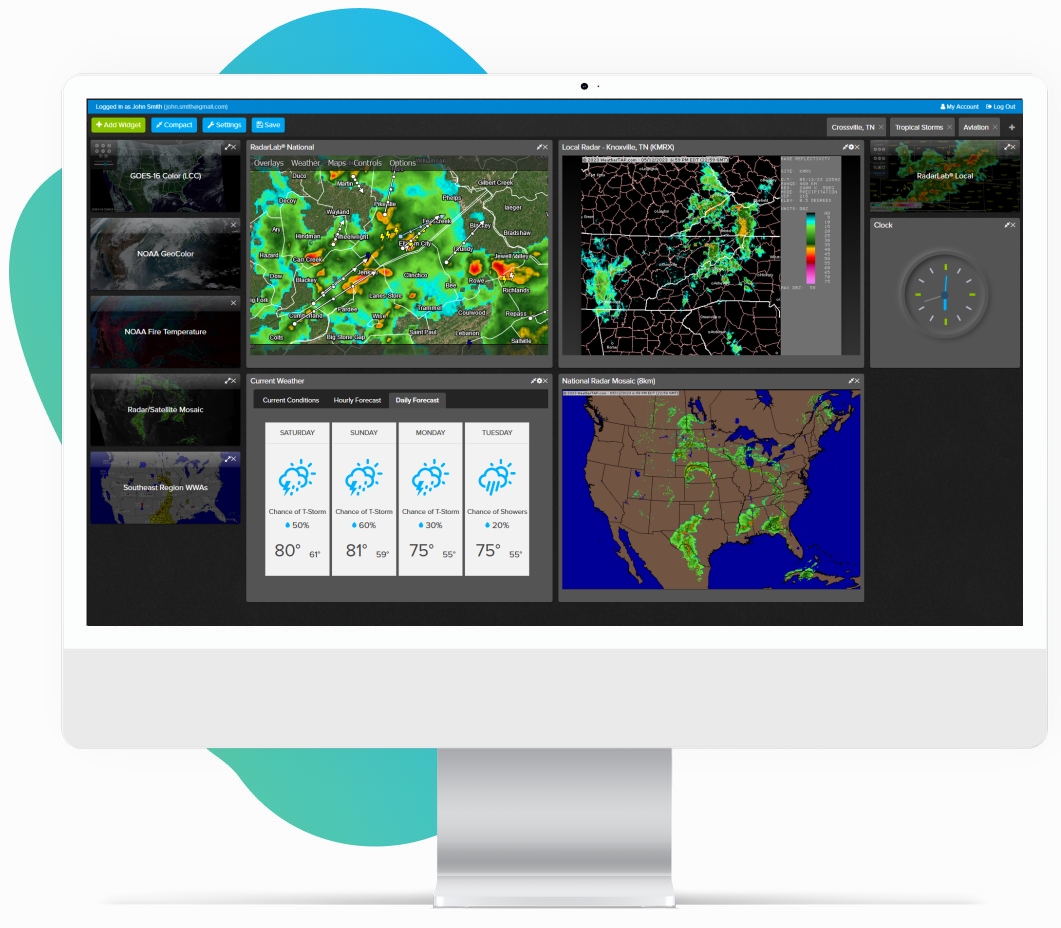
Reviews & Testimonials

What our customers have to say

WeatherTAP gives me the analytical tools I need to make informed decisions regarding the protection of my community. Your new dashboards allow me to view multiple tools simultaneously while also allowing me to access external tools with the click of a mouse.
T.J. ManorEmergency Management Coordinator for the City of Grapevine, TX
WeatherTAP has been amazing for peace of mind with the ability to bring up storm tracks and cell progression overlaid with custom locations for different places I care about (my house, dad’s house, work, etc.).
T. RobinsonweatherTAP subscriber
You have everything from everyday weather to aviation weather, all done very professionally. I love weatherTAP and use it, not only personally, but to notify my friends and family of impending dangerous weather conditions in their areas. Keep up the great work. WeatherTAP is worth every penny.
Jim TroskyweatherTAP subscriber
We are a general aviation airport and use weatherTAP for our in-terminal building weather needs, running full-time on a public view monitor in our passenger lounge and available on a PC in the Pilot’s Lounge for flight planning. We are very satisfied with the service. Highly recommend it.
Ken SwaringenAirport Director, Stanly Co Airport
Both professionally and personally since I retired after 30 years as a newspaper reporter, I use weatherTAP, seemingly every day, mostly for radar and forecasts.
Stuart TomlinsonweatherTAP subscriber
I use weatherTAP for personal reasons but it is also a valuable tool for use as a volunteer for our County Emergency Management Agency. I can access it anywhere by for or ANY computer. No specialized software required. WeatherTAP is easily customized to suit my needs—what I wish to display and how I wish to see it. All of that makes it a great tool.
Alan JordanaweatherTAP subscriber
Very reasonable price, awesome graphics and very fast. I like it very much.
John YorkweatherTAP subscriber
I probably use weatherTAP four out of seven days during “regular” weather. It is my go-to for thunderstorms and hurricanes.
S.W.weatherTAP subscriber


Emergency Management
Make the right decisions
And we mean more than just deciding if you need a jacket or an umbrella. Our suite of weather products help you make informed decisions. Schedule your crews so you don’t waste time or resources. Prepare for a severe weather event and mobilize your response. Keep your family, your workers and your community safe because you know the weather ahead.
How weatherTAP can benefit your agency
Track Storms
Track severe weather to any location
Use our customizable RadarLab® software to track storms right to your doorstep. Multiple features allow you to track severe weather down to street-level, so you know to take cover or if the storm will pass you by. You can also set up custom locations and be alerted when storms are approaching.
Start tracking weather now


Complete Weather Suite
Or do you just love weather?
We have thousands of weather products for you to enjoy.
 Explore real-time and forecast data
 Access maps that meteorologists use to predict the weather

Unrestricted Access
Utilize your weather tools anywhere

No ads, just weather
You read that right. Zero ads. No annoying pop-ups. No autoplay videos. No sidebar ads making weather maps smaller. No having to scroll past ads for information. Ever.

Cross-platform compatibility
All you need is an internet connected device and you can access thousands of weather products on your desktop, laptop, tablet or phone.

Connect